Ministra Player for Android TV
- 1.9
- Rating
- 100.00K
- Installs
- Free
- Price

 Analysis by App-foxy
I approached Ministra Player as a practical Android TV viewer rather than as a general-purpose streaming service. That distinction matters: the app is intended to play television and video supplied through an IPTV provider, so its usefulness depends heavily on the service and account connected to it. On its own, it is not a replacement for a broad subscription catalog such as Netflix, nor is it a simple local media player for files already stored on your device.
In my experience, the appeal is straightforward. If your television provider uses the Ministra platform, this player can give you a focused place to watch that provider’s channels and video content. The interface is built around viewing rather than editing, recording, or managing a personal library. That narrow purpose can be a strength, but it also explains why the app may feel irrelevant to someone who does not already have compatible IPTV access.
How Ministra Player feels during everyday viewing
In my day-to-day use, the key question is whether Ministra Player gets me back to watching without making routine channel changes feel like troubleshooting. I pay attention to the small handoffs—leaving one stream, choosing another, and returning after a brief interruption—because those shape a relaxed evening more than a feature list does. That everyday rhythm also makes it easier to spot when the provider, rather than the player, is the source of friction.
You May Also Like

 Blood Strike: 2.5 Anniversary
Blood Strike’s Loadouts Turn Every Drop Into a Tactical Gamble
A close look at Blood Strike’s custom loadouts: how fast access to signature weapons reshapes its battle royale rhythm, rewards preparation, and narrows the gap between fights.

 Pandora - Music & Podcasts
Pandora’s Music Is Easy to Start, but Harder to Recover
Pandora’s strength is its low-effort path from a seed to a station. Its weak spot is how much confidence it asks you to place in connection, setup, and quiet recovery.

 8 Ball Pool
 Is Built on Rivalries, Rematches, and Routine
A close look at the rivalries, rematches, shared routines, and unanswered safety questions that turn a quick pool match into a persistent mobile community.

 Samsung Music
’s Quiet Strength Is Playing What You Already Own
Its reach comes less from spectacle than from dependable access to a personal library. That simplicity is both the app’s strongest retention engine and its ceiling.

 AccuWeather: Weather Radar
AccuWeather Review: A Quick, Clear Forecast for Everyday Decisions
For everyday plans, the best forecast is the one you can understand quickly. AccuWeather makes rain timing, radar, and local conditions easy to act on, with a few trade-offs.

 Hill Climb Racing
Why Hill Climb Racing Still Turns Crashes Into One More Run
A tiny car, a bumpy hill and one more upgrade: Hill Climb Racing keeps resurfacing because its simple chaos makes every near-miss feel personal.
More From Our News Desk
View All News


Speed expectations depend on the IPTV service
The first thing I would set clearly is that perceived speed is not controlled by the app alone. Opening the player, loading a channel list, starting a stream, and recovering from a pause all involve the Android TV device, the home network, and the IPTV provider. A responsive television box with a stable connection can make the experience feel immediate, while a congested network or overloaded provider can make the same player seem slow.
That makes this a different situation from judging an offline video player. With an offline app, a delay usually points toward the device or the application. With Ministra Player, a delay may come from the stream itself. I found it more useful to judge the app by how directly it gets me to provider content and how sensibly it behaves when playback is interrupted, rather than expecting every channel to start at the same pace.
The app is free to install, which lowers the cost of trying it, although in-app purchases range from $0.99 to $31.99 per item. Those purchases should not be confused with universal access to television content. The important question before installing is whether your IPTV provider supports this player and whether your account is ready to use with it.
For a household that already has compatible service, the workflow is appealingly focused. You are not asked to browse unrelated entertainment categories or maintain a separate media library. You open the player for provider television and video, choose what you want, and return to watching. That simplicity is more valuable on a television remote than it might be on a phone, where typing and navigation are easier.
What happens during heavy-use moments
The most demanding moments are not necessarily the opening screen. They are the transitions: moving quickly between channels, starting a video after another stream, or returning to playback after the network has briefly stalled. These moments expose the difference between a clean IPTV setup and one that is already struggling with bandwidth or service responsiveness.
My practical advice is to test the app at the time you normally watch, not only during a quiet afternoon. An evening household connection may be handling several phones, a game console, and another television. If Ministra Player hesitates then, changing the player may not solve the underlying problem. Testing another channel in the same provider service can also help distinguish a single stream issue from a wider connection problem.
A useful habit is to avoid blaming the Android TV box after one failed start. I would first try a different channel, wait briefly, and reopen the player only if the problem affects several streams. Repeatedly restarting the television can waste time when the actual interruption is upstream. This simple check is one of the more important trade-offs with provider-based playback: the app is a viewing window, but it cannot repair a weak delivery service.
There is also a difference between occasional viewing and long sessions. Someone watching one program for an hour may never notice the same transition friction that bothers a viewer who constantly jumps between live channels. If you channel-surf heavily, the responsiveness of the provider’s guide and stream handoff will matter as much as the player’s own interface.
Reliability and recovery when playback breaks
Reliability here means more than simply launching successfully. I look for whether the app remains useful after a temporary interruption, whether returning to it is understandable, and whether the viewer can recover without having to rebuild the entire setup. IPTV playback is naturally sensitive to network changes, so occasional buffering is not automatically evidence of a defective application.
When a stream stops, I would use a measured recovery sequence: wait a moment, try the same content again, then test another provider stream. If other channels work, the original stream may be the problem. If nothing plays, check the network and provider status before assuming the player itself is broken. This approach is especially helpful for less technical family members because it turns a vague “the TV is not working” complaint into a short diagnosis.
The app’s public reception is a reason to keep expectations realistic. It has an average rating of 1.9 from over 700 ratings, with more than 40 written reviews, and its install count is over 100,000. Those figures do not tell me that every installation is unstable, but they do suggest that many users have encountered friction worth taking seriously. I would not choose it blindly for a television that must work without explanation for guests or older relatives.
At the same time, ratings for IPTV players can reflect account setup, provider compatibility, stream quality, and device limitations as well as the software itself. A poor review may describe a service problem that the player cannot control, while another may reveal a genuine usability issue. I read the rating as a warning to test carefully, not as proof that the app will fail on every Android TV device.
Device limits matter more than the app’s simple purpose suggests
Ministra Player is categorized among video players and editors, but its Android TV role is much narrower than that label might imply. I would not install it expecting video editing tools, advanced local-library management, or the broad format support associated with a desktop media player. Its job is to present IPTV television and video in a form suited to the living room.
That focused job should help on modest hardware, because the app is not trying to be a full production suite. Still, streaming performance is not only about how demanding the application looks. Decoding the incoming video, maintaining the network connection, handling the television interface, and sharing resources with other Android TV processes all affect the result.
On an older or inexpensive television, I would pay attention to more than whether the app installs. Menus may feel less immediate, switching may expose delays more clearly, and background activity from other apps can make recovery slower. Keeping unused apps closed and leaving reasonable storage space available are sensible maintenance steps, though they cannot compensate for an incompatible provider or poor Wi-Fi coverage.
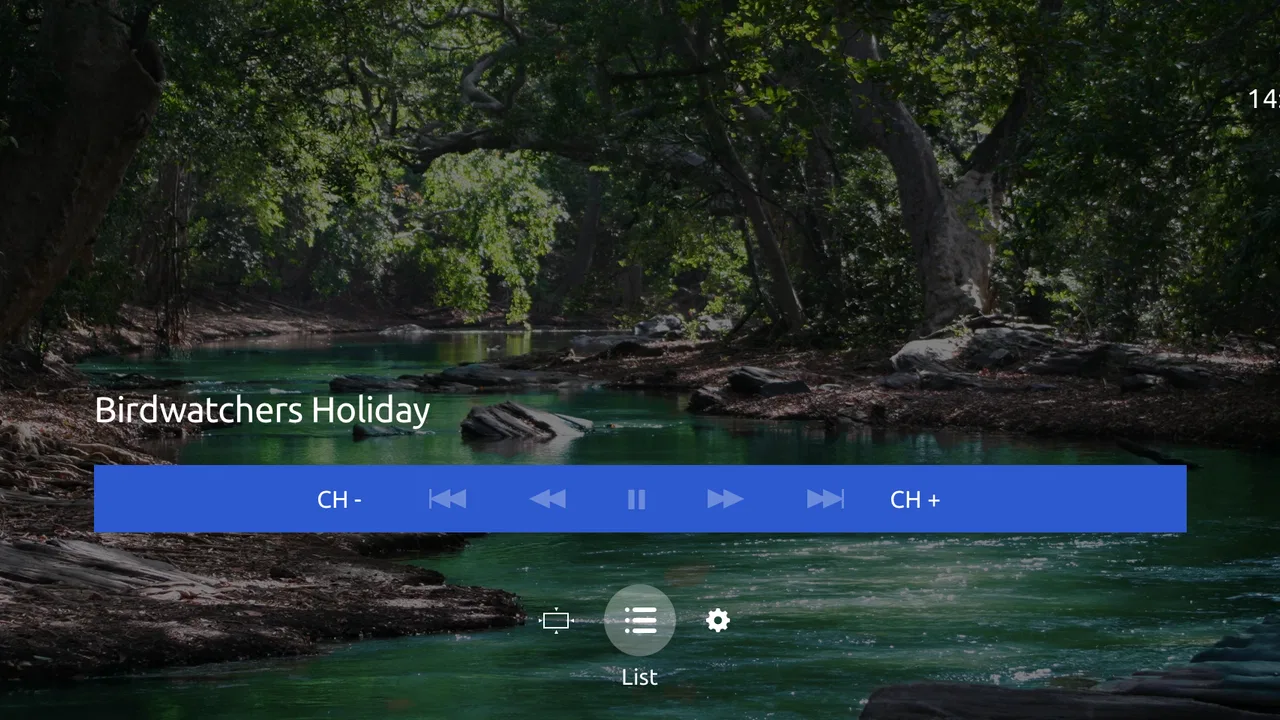
Remote control design is another practical constraint. A player can be perfectly usable on a touchscreen and still feel awkward from the sofa if focus movement is unclear or if too many actions require precise navigation. I found the best fit is a setup where the provider’s content is already organized and I mainly need to select and watch. It is less attractive for someone who wants to search, sort, and customize a large personal collection from the television.
A realistic household scenario
Imagine a family using an Android TV in the evening. One person wants a live channel, another has just finished using the network for a video call, and a child is downloading a large game on another device. Ministra Player may open normally, yet the chosen stream can still take longer to begin or pause unexpectedly. In that situation, I would pause the download, move the television closer to the router if possible, and test a second channel before reinstalling anything.
If the same account works reliably after the network settles, the player has probably served its purpose adequately. If every channel fails while other internet services work, the provider account or IPTV platform deserves attention. This is why I would recommend keeping the provider’s support details available rather than treating the app as an isolated product. The player sits inside a chain, and troubleshooting the chain is faster than repeatedly pressing buttons.
For a single viewer who watches a familiar group of channels, that arrangement can be perfectly reasonable. For a household that expects instant switching, flawless playback during busy hours, and no need to understand provider dependencies, it may be frustrating. The right choice depends less on the app’s price and more on how much control you want over the entire viewing experience.
How it compares with usual alternatives
Compared with a mainstream streaming app, Ministra Player offers a different kind of access. Services such as Netflix or Disney+ generally organize their own catalogs and account systems, while this player is tied to content delivered by an IPTV provider. If you want on-demand discovery across a large, familiar catalog, a mainstream service is the more natural option. If your television package is built around provider channels and video, Ministra Player is more relevant.
Compared with VLC or another general media player, it is also aimed at a different workflow. VLC is commonly chosen for local files and broad playback flexibility. Ministra Player makes more sense when the content arrives through a compatible IPTV service and you want a television-oriented viewing route. Choosing between them is not mainly a question of which has more features; it is a question of where your video comes from.
Dedicated provider apps can be preferable when your television company offers one that is better maintained for your exact device. A provider-specific application may include account help, billing context, or features designed around that service. On the other hand, Ministra Player can be the practical option when the provider specifically uses the Ministra environment. Compatibility should therefore come before general reputation.
Who should install it, and who should skip it
I would recommend trying it if you already subscribe to an IPTV provider that uses the Ministra platform, primarily watch on Android TV, and prefer a direct route to television and provider video. It is also worth considering when you want a free player download before committing to a more complicated setup. The Everyone age rating makes it suitable for a broad household audience, though the actual content remains connected to the provider’s offering.
I would skip it if you are looking for a standalone entertainment catalog, a local file player, or a video editor. I would also be cautious if your home network is unreliable and you need guaranteed live playback, because no player can make an unstable connection behave like a dedicated broadcast feed. People who frequently switch between many services may find a unified smart-TV interface more convenient.
Before relying on it for daily viewing, I would confirm three things: that the provider supports Ministra Player, that the account credentials or activation process are available, and that the Android TV device is connected where you normally watch. A short test during peak household use is more informative than a quick installation followed by a single channel check.
My performance verdict
Ministra Player is best understood as a specialized bridge between an IPTV provider and an Android TV screen. Its strongest quality is focus: it is designed for provider television and video rather than trying to become an all-purpose media center. That can make it a sensible, low-cost choice for the right subscriber.
My reservations are equally specific. Playback speed and stability can be difficult to separate from provider and network performance, recovery may require basic troubleshooting, and the low average rating means I would test it rather than assume a smooth experience. The app’s install base of over 100,000 shows that it is being used, but popularity alone does not remove the need to check compatibility.
My bottom line is simple: choose Ministra Player when your IPTV provider already fits its ecosystem, not because you want a general streaming app. For that audience, it may be a practical way to watch on Android TV. For everyone else, a mainstream streaming service or a local media player will usually be a clearer and less dependent choice.
Infomir has kept the product’s purpose easy to understand, and the free entry point makes testing painless. I would treat the first viewing session as a compatibility check: try several channels, test the app when the household network is busy, and see how comfortably you can recover from a pause. If those checks go well, the player can earn a place in your television routine; if they do not, changing the player may be less useful than changing the service or choosing an alternative built for your content source.
FAQs for Ministra Player for Android TV
01What is Ministra Player for Android TV used for?
Ministra Player is an Android TV application designed to access television channels, video-on-demand content, and other media services provided by a compatible IPTV or OTT operator. The app itself usually works as a client rather than an independent streaming service, so the available channels, movies, series, and features depend on the subscription and platform supplied by your television provider.
02Does Ministra Player include free channels or content after installation?
Installing Ministra Player does not normally provide a complete catalog of free entertainment by itself. In most cases, you need an account, activation code, portal address, or subscription from a Ministra-compatible service provider. Before downloading, check with your operator to confirm whether the application is supported, what package is included, and whether additional monthly fees or activation charges apply.
03How do I sign in to Ministra Player on an Android TV device?
The sign-in process can vary depending on the provider that operates the service. After installation, the app may request a username and password, an activation code, or a portal URL supplied by your operator. Using a television remote can make long credentials inconvenient, so keeping the account details nearby or using the provider’s recommended activation method can make setup considerably easier.
04What Android TV requirements and internet connection are needed?
Ministra Player is intended for compatible Android TV devices, televisions, or streaming boxes, but the exact supported versions may depend on the release distributed by your provider. A stable broadband connection is important for live television and high-definition video. If playback frequently buffers, test the connection, move closer to the router, use Ethernet when possible, and verify that your subscription supports the selected video quality.
05Why might channels or videos fail to play in Ministra Player?
Playback problems can result from several causes, including an expired subscription, incorrect account details, an unavailable provider portal, network instability, device compatibility issues, or restrictions imposed by the content operator. Restarting the app and Android TV device may help with temporary errors, but persistent problems should be reported to your IPTV provider because they usually control the servers, channels, and account permissions.
Pros
- Supports live TV
- video-on-demand
- and archived content in one app.
- Designed for Android TV with remote-friendly navigation and large controls.
- Can display channel guides with program information when supported by the provider.
- Supports multiple playlists or portal profiles on compatible installations.
- Playback quality can be good when the IPTV provider offers stable streams.
Cons
- Requires a compatible IPTV subscription or portal; it does not provide channels itself.
- Features and available content depend heavily on the service provider’s configuration.
- Some providers may require manual portal or playlist setup before viewing.
- Performance can vary between Android TV devices
- especially on older hardware.
- The interface may feel dated compared with newer streaming platforms.

Ministra Player for Android TV
Gallery